Nvidia DLSS Integration and Professional Studio Workflows in Unreal Engine 5-Based AA Game Projects
Introduction to Advanced Rendering Architectures and the Need for Scaling
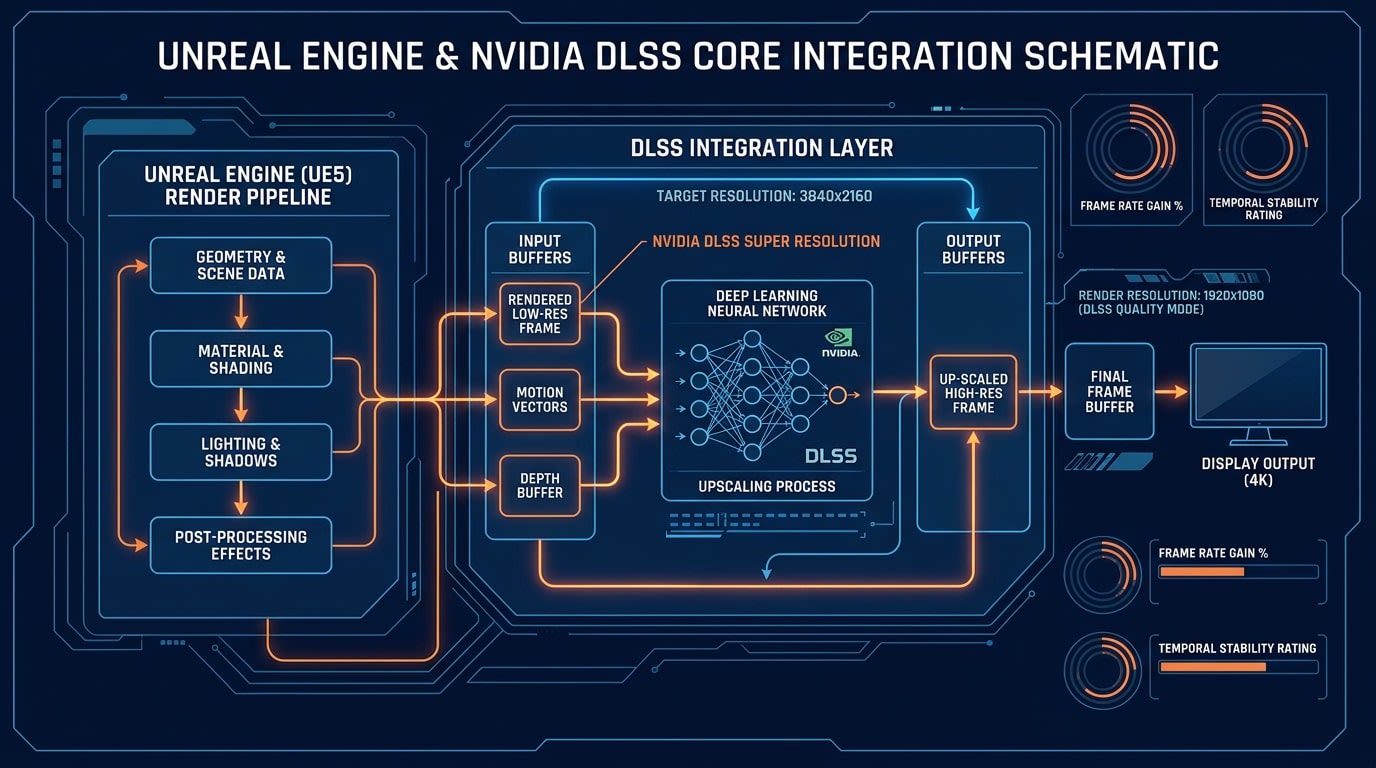
In the modern video game industry, AA (Double-A) studios—despite lacking AAA budgets and teams of hundreds—aim to achieve high visual quality goals, positioning them as the most aggressive adopters of technological innovations. The release of the Unreal Engine 5 (UE5) engine has pushed the boundaries of photorealism with its virtual geometry system Nanite and fully dynamic global illumination solution Lumen. However, these revolutionary technologies create a massive computational load on graphics processing units (GPUs). 1 To achieve a target of 60 frames per second (FPS), Lumen technology has to drop the internal resolution to a level much lower than the native screen resolution (for example, 1080p internal processing on a 4K screen). 1 At this point, the industry-standard way to overcome hardware limitations and multiply performance while preserving visual fidelity is AI-driven image reconstruction algorithms. Nvidia's Deep Learning Super Sampling (DLSS) architecture, the industry leader in this field, is a complex technology that synthesizes missing pixels through neural networks using motion vectors and depth buffers obtained from consecutive frames instead of enlarging pixels with traditional spatial methods. 3 For a professional AA studio, integrating DLSS into a project is not just a matter of enabling a plugin; it is a multi-dimensional engineering problem that requires the complete synchronization of the render pipeline, source code management, quality assurance (QA) processes, and artist workflows. This report examines in depth how DLSS 3.5, DLSS 4, and Streamline SDK architectures are integrated into Unreal Engine 5 projects in a professional environment.
Streamline SDK Framework and Architectural Foundations
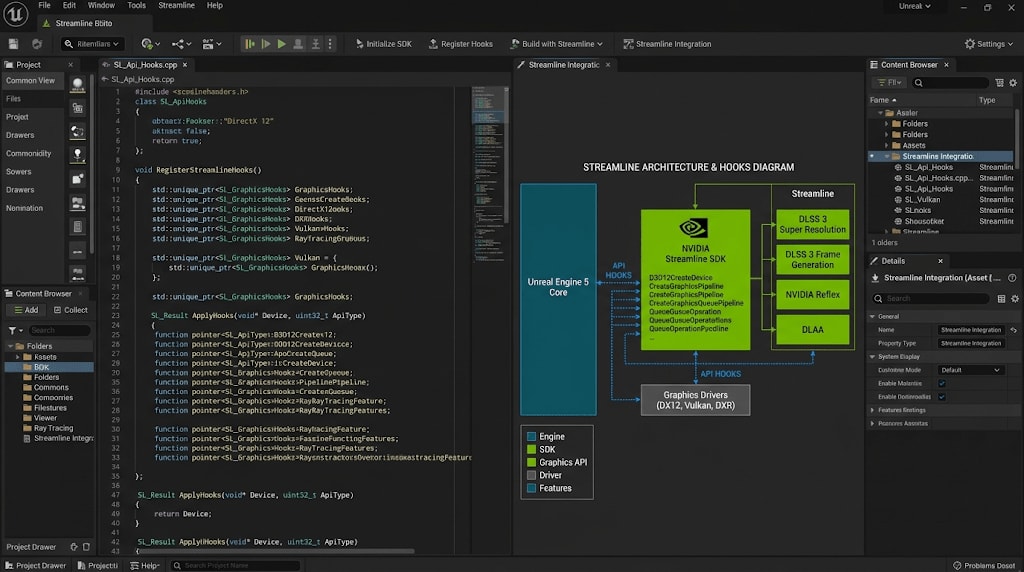
Nvidia developed the Streamline SDK to modernize DLSS integration and ease the integration burden on game developers. Streamline is an open-source, independent of hardware vendors (IHV) framework that acts as an interposer layer between the game engine and render APIs such as DirectX 11, DirectX 12, or Vulkan. 6
In the past, developers had to write separate manual API hooks into the game engine's render pipeline for each upscaling technology, such as Nvidia DLSS, AMD FidelityFX Super Resolution (FSR), and Intel XeSS. 6 The Streamline architecture reduces this process to a single integration point. The developer tags resources such as motion vectors, depth buffers, and user interface (UI) color buffers once and feeds this data into the Streamline framework. 6 Streamline uses this data to run all supported upscaling plugins at the appropriate graphics pipeline stage.
C++ and Engine-Level Lifecycle of Streamline Integration
The initialization and management of the Streamline SDK must take place in the earliest loading stages of the engine. The initialization process is performed via the slInit function before any DirectX or Vulkan API calls are made. 8 At this point, the engine loads the supported and requested features but does not initialize them yet. Full functionality of the features is triggered when the engine creates a render API device. 9 The following structure shows how the Streamline library is initialized via C++:
#include <sl.h>
#include <sl_consts.h>
#include <sl_dlss.h>

sl::Preferences pref{};
pref.showConsole = false;
pref.logLevel = sl::eLogLevelDefault;
pref.applicationId = myId;
pref.engineType = sl::eEngineTypeUnreal;

if (SL_FAILED(res, slInit(pref))) {
    if (res == sl::Result::eErrorDriverOutOfDate) {

    }
}
Security protocols are of great importance at this stage. Professional studios must verify the dual Nvidia and Streamline digital signatures of the sl.interposer.dll file to prevent cheat software (DLL hijacking) in multiplayer games. 6 Before moving to the Shipping phase, watermarked libraries used during the development process must be replaced with production-ready, signed libraries. 6
Evolution and Modular Structure of DLSS Technology
In the Unreal Engine 5 environment, DLSS is not a single feature, but a suite of technologies. 3 Studios decide which modules of this suite to use based on the nature of the project:
DLSS Super Resolution (SR): This is the foundational form of upscaling. Using Tensor Cores, it produces high-resolution and detailed output from low-resolution input. 3
DLSS Frame Generation (FG): Introduced with DLSS 3, this feature uses AI to synthesize a completely new frame between two actual rendered frames. It can double performance by overcoming traditional CPU bottlenecks. 6
DLSS Multi Frame Generation: This is the newest feature introduced with RTX 50 series GPUs and DLSS 4. It has the capacity to generate up to 3 artificial frames per processed frame. 10
DLSS Ray Reconstruction (RR): In scenes using Ray Tracing and Path Tracing, this is an AI model that replaces hand-tuned traditional denoisers and provides much higher temporal stability. 3
Nvidia Reflex: This is a low-latency technology that synchronizes CPU and GPU queues to compensate for the temporal processing latency created by Frame Generation. It comes directly with the Streamline plugin. 6
Professional Studio Workflows: Perforce, Source Control, and Build Processes
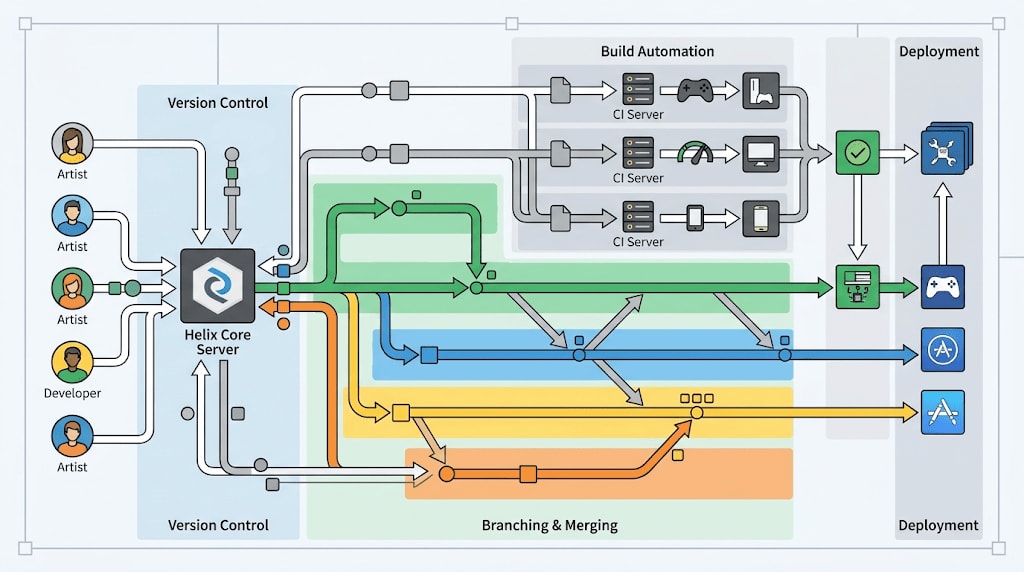
While independent developers generally manage their projects on local disks or with simple cloud-based synchronization tools, the complex file structures of AA and AAA studios necessitate industry-standard version control systems. Unreal Engine projects consist of countless binary assets that are not text-based and can often reach tens of terabytes in size.
Why Perforce (Helix Core) Instead of Git?
Although Git is the de facto standard in the software world, the overwhelming majority of professional game studios prefer the Perforce (Helix Core) infrastructure. 13 Git is inherently a distributed system and does well with text-based code merging, but it was not designed to handle large binary files. 15 Even when the Git LFS (Large File Storage) plugin is used as a patch, it offers an abstract and complex experience for artists. Perforce's most critical advantages are its centralized structure and "Exclusive Checkout" feature. While an environment artist is working on a massive Unreal Engine map (.umap) or a character animation file, they lock the file via Perforce. This prevents other artists from making simultaneous changes to the same file, reducing binary file conflicts—which are impossible to merge—to zero. 16 Furthermore, thanks to its built-in integration into the game engine, Perforce allows material or texture edits to be versioned directly from within the engine interface (in-engine). 13
Custom Engine Builds and DLSS Integration
AA studios rarely use standard pre-compiled engine versions offered through the Epic Games Launcher. They compile the engine from source code to make C++ level optimizations tailored to the game's specific needs, modify memory management, or hook deep plugins like Streamline. 17 DLSS integration starts precisely with this C++ source code integration. Nvidia hosts its own modified Unreal Engine branches on GitHub. 19 During the integration process, the developer in the studio's "Build Engineer" role follows these steps:
The specific plugin branch from Nvidia's repository (e.g., dlss3/sl2-5.1-dlss-plugin or the current branch for the relevant UE version) is cloned. 20
Streamline hooks are merged with the studio's main engine code repository. 19
If the newest version of the engine (e.g., 5.5.1) is being used and official DLSS support has not been released yet, the studio must integrate community-sourced unofficial patches into the codebase and put these codes through stability tests. 21
Continuous Integration (CI/CD) and Deployment Pipelines
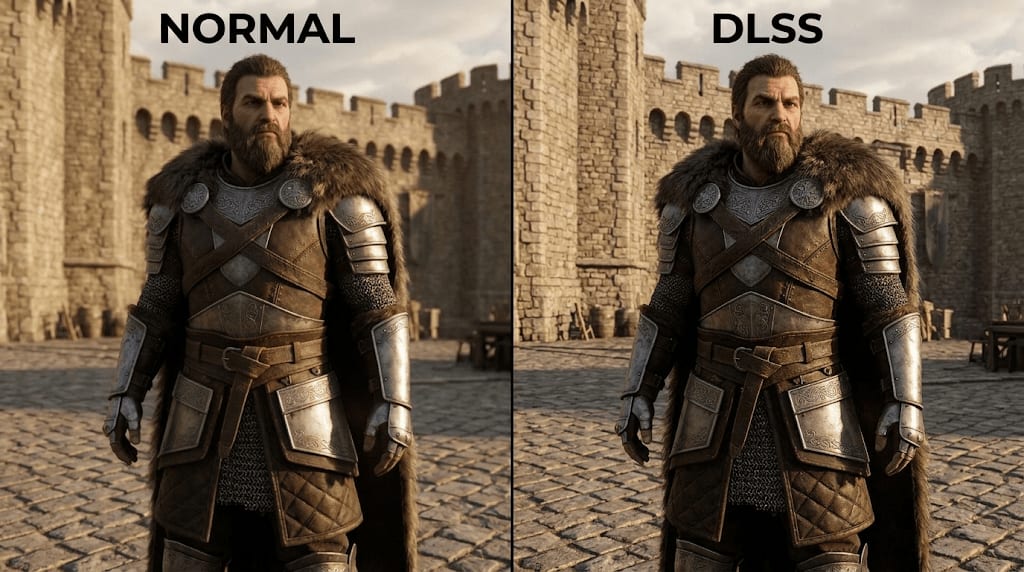
Once engine source codes and plugins are merged, automation comes into play to prevent artists and designers from waiting hours for engine compilation every morning. Continuous integration (CI/CD) tools such as Jenkins, GitHub Actions, or Epic Games' Horde system automatically recompile Unreal Engine from scratch on cloud servers or local build farms with every major code change taking place in the Perforce repository. 22 When the build is complete, the resulting massive binaries are distributed to the team via Perforce or special internal tools. 22 During this process, p4ignore or Perforce file type rules must be configured with extreme precision. Streamline dynamic link libraries (DLLs) such as sl.interposer.dll and nvngx_dlss.dll should be kept under version control, while temporary Derived Data Cache (DDC) files generated on developers' machines should not be submitted to the repository. 18 This prevents repository bloat and unnecessary network traffic.
Optimization Issues Encountered in the Render Pipeline and Solutions

Adding the DLSS plugin to the project (enabling it from the Edit -> Plugins menu) is only the easiest step of the process. 19 The real engineering effort is spent at points where the AI model conflicts with the complex render passes of Unreal Engine 5.
Temporal Anti-Aliasing (TAA) and Temporal Super Resolution (TSR) Conflicts
Unreal Engine 5 uses Epic Games' self-developed Temporal Super Resolution (TSR) algorithm as the default upscaling solution. 24 Both TSR and DLSS are temporal algorithms that evaluate data from past frames (history frames) to generate new frames. Running them simultaneously not only consumes GPU bandwidth but also leads them to "fight" for hardware resources, producing heavy visual artifacts. 25 In professional workflows, when DLSS is enabled, TSR must be disabled immediately. When developers adjust quality modes via Blueprint or C++, DLSS automatically overrides and deactivates the engine's built-in screen percentage (r.screenpercentage) setting. 25 This eliminates the developer's burden of calculating the screen percentage manually.
The table below details the standard screen percentage equivalents and use cases of DLSS modes:
DLSS Preset Mode | Scaling Ratio | Technical Use Case and Target Hardware |
|---|---|---|
DLAA | 100% (1.0x) | Used solely for highest-quality AI-powered anti-aliasing without downscaling. Designed for hardware with plenty of GPU headroom. |
Quality | 66% (0.66x) | Preferred for visual fidelity closest to native resolution when Ray Tracing or Lumen is enabled. Used especially for 1440p and 4K resolution targets. |
Balanced | 58% (0.58x) | Used in intense action scenes where performance and visual quality are equally important. |
Performance | 50% (0.50x) | Used in e-sports, competitive games, or high refresh rate monitors targeting 120+ FPS. This is the most suitable scenario for DLSS 4.5 Preset M. |
Ultra Performance | 33% (0.33x) | Created for 8K (7680x4320) resolution targets. Because it is a very aggressive upscaling, it can cause severe detail loss and blockiness when Nanite is disabled or in low-polygon scenes. |
Motion Vectors and Ghosting Problem
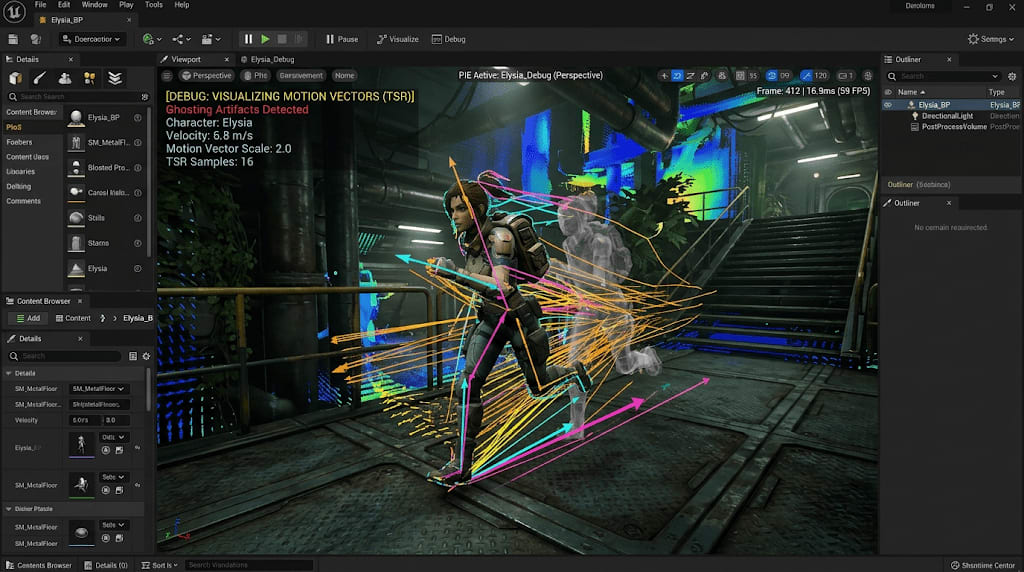
The biggest vulnerability of AI-based reconstruction algorithms is ghosting and smearing artifacts. DLSS requests Motion Vectors from the render pipeline within the G-Buffer to track the movement of objects. If an object is moving on the screen but does not produce motion vectors, DLSS assumes that the object's pixels remain stationary. When the new frame is rendered, the data of the old frame continues to stay on the screen, leaving a long trail (tail) behind the object.
Resolving World Position Offset (WPO) and Foliage Errors
In Unreal Engine 5, the area where this issue is most frequently experienced is wind-affected trees and grass. For optimization purposes, the engine does not generate motion vectors by default for foliage that provides GPU-based movement on vertices via WPO (World Position Offset) shader nodes.
To solve this chronic issue, Technical Artists of AA studios deeply intervene in the engine configuration files (DefaultEngine.ini). First, it is mandatory to enable the "Support Accurate Velocities from Vertex Deformation" setting in the detail panels of moving WPO materials. Then, the following console variables (CVars) are used to force the render pass:
r.BasePassForceOutputsVelocity=1: Forces the Base Pass to generate velocity data under all conditions. This largely eliminates ghosting, but it has a performance cost as it increases GPU memory bandwidth.r.NGX.DLSS.DilateMotionVectors=1: Ensures that motion vectors are dilated outward from object edges. It allows DLSS to better capture pixels in scenes with thin geometries (leaves, wires).r.Shadow.Virtual.NonNanite.IncludeInCoarsePages=0: WPO-induced movements cause massive performance drops by constantly invalidating the cache of Virtual Shadow Maps (VSMs). This command restores performance by excluding non-Nanite foliage from coarse shadow pages.
Management of AI Models: DLSS Presets
The power of DLSS lies in offering different AI models continuously trained on NVIDIA supercomputers. Developers can choose different models embedded within the nvngx_dlss.dll file according to the game's specific visual style. These settings are called J, K, L, and M presets.
For example, in a pure rasterization-based (non-ray tracing) game, Preset M is preferred as it reduces ghosting while increasing performance. While Preset M provides peak performance on RTX 40 and higher series, it can cause stability issues on previous generations. On the other hand, if the game contains intense Ray Tracing or DLSS Ray Reconstruction is active, Preset M can make the image overly noisy; using Preset K in these scenarios significantly increases image stability.
User Interface (UI) Buffers and Post-Processing Ordering
Even if the three-dimensional world of the game is rendered perfectly, 2D HUD elements overlaid on the screen or 3D widgets placed in the game world (World Space) can be ruined by DLSS Frame Generation.
UI Color and Alpha (TagUIColorAlpha) Mechanism
Frame Generation sees the screen as a holistic canvas when generating artificial frames. If the game's health bar or ammo counter is sitting in a corner of the screen and the camera underneath is rotating, the FG algorithm also shifts and warps the interface pixels along with the camera movement. This causes the interface to vibrate and blur severely.
To solve this critical issue, NVIDIA has added a special interface buffer mechanism to the Streamline plugin. Immediately after the game engine renders the UI layer (but before it is presented to the screen), this system kicks in:
Separation: The developer isolates UI pixels by activating the
r.Streamline.TagUIColorAlpha=1command.Determining the Threshold Value: Using
r.Streamline.TagUIColorAlphaThreshold, pixels with an alpha value above a certain level are tagged as "This is a UI element, do not include it in the Frame Gen process" (the default value is 0.0).Recombination: Frame Generation works only on the 3D world, generates artificial frames, and in the final step, the isolated UI layer is composited on top of these frames with its original sharpness.
The biggest developer trap here is using legacy methods like UWidgetBlueprintLibrary::DrawText instead of UMG widgets. Because this function does not write to the alpha channel, it cannot be perceived as an interface by Streamline and leads to distortions on the screen. Similarly, for 3D widgets in the game world, if the material's blend mode is changed from Masked to Translucent, blurs caused by TSR and DLSS can be reduced.
Positioning of Post-Processing Effects
Post-process effects such as Film Grain, Chromatic Aberration, Lens Flare, and Depth of Field, which aim to imitate the aesthetics of filmmakers, are the biggest enemies of AI image upscalers.
DLSS is trained to take a clean image and upscale it to a higher resolution. If artificial Film Grain noise is added to the image before the DLSS process is performed in the render pipeline, DLSS's neural network perceives this grain as an "error" or a "low-resolution artifact." The algorithm tries to denoise these grains, causing the image to become muddy and blurry.
Professional studios strictly control the render order of post-process materials. Optical effects (Grain, Chromatic Aberration) should always be applied after the DLSS process is finished and the image reaches full screen resolution. Additionally, the Sharpening parameter built into DLSS can be used independently of the post-process pipeline to eliminate slight blurriness caused by lower-quality DLSS profiles.
Quality Assurance (QA), Profiling, and Performance Validation
Once technical integration is achieved, an aggressive performance profiling and quality assurance process is initiated to ensure the game reaches Shipping Quality. The engine's default tools may not always work fully compatible with the Streamline architecture.
Advanced Profiling Tools and Metric Readings
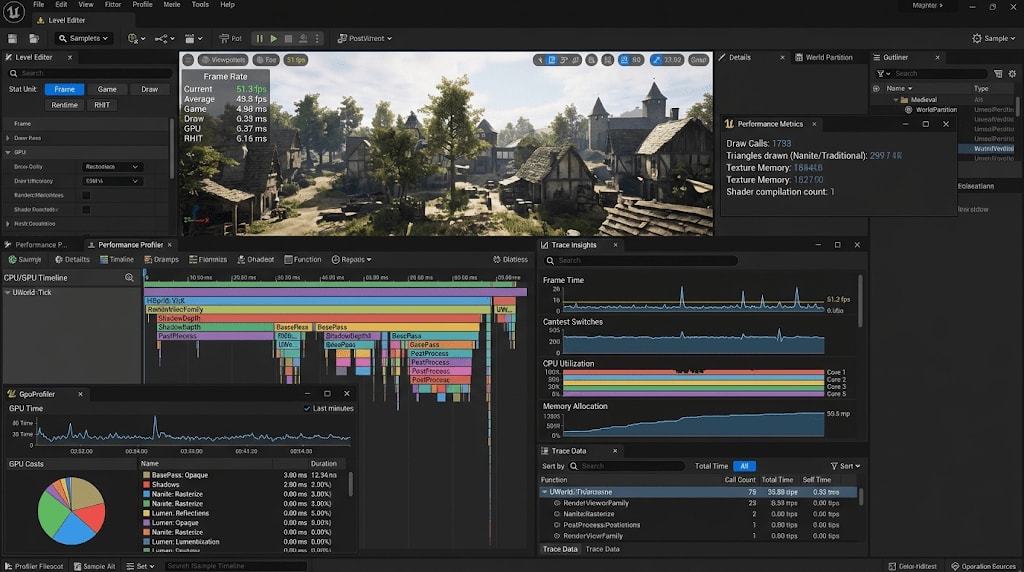
It is misleading for developers to optimize by only looking at the FPS counter. Unreal Engine is not aware of extra frames generated entirely by artificial intelligence via Frame Generation. In a situation where the engine indicates it is producing 60 frames per second, the hardware may actually be presenting 120 frames to the monitor.
Therefore, AA studios use the following special tools and commands instead of the standard stat fps:
stat dlssg: This console command prints the actual screen frame rate and the calculation overhead of Frame Generation on the graphics card to the screen in milliseconds (ms), taking the generated artificial frames into account.Unreal Trace Insights & GPU Profiler: Inspects bottlenecks in the render pipeline with microsecond precision. Details how long each render pass (Base Pass, VisBuffer, Lighting) takes. Nanite VisBuffer and HZB (Hierarchical Z-Buffer) times are optimized here.
Nvidia FrameView SDK and ICAT: QA teams, who measure latency and hardware power consumption with FrameView, also perform A/B tests using Nvidia ICAT (Image Comparison and Analysis Tool). These tools are used to detect microscopic quality losses in chain-link fences, hair, or long-distance details between native resolution and DLSS resolution.
Integration Validation Checklist (QA Checklist)
There is a strict Streamline checklist that technical teams must approve before the game is released. The table below summarizes the critical headings and conditions that must be verified in this checklist:
QA Checkpoint | Verification Criteria and Action |
|---|---|
Transmission of Input Buffers | It must be tested that depth buffers, motion vectors, and color buffers without HUD are transmitted to Streamline without loss. |
Timing and Frame Index | It must be approved that correct common constants and Frame Index for each rendered frame are transmitted synchronously with the slSetFeatureConstants method. |
Pause and Menu Behavior | When the game is paused, transitioning to loading screens, or in the menu, the DLSS Frame Generation mode must be turned off immediately (eOff). Otherwise, UI errors and memory leaks may occur. |
DLL Security Transition | It must be ensured that watermarked DLLs with disabled security audits used during the development phase are replaced with unwatermarked production DLLs. |
Swap Chain Management | Whenever DLSS-G is toggled on and off, the Swap Chain must be recreated to prevent unnecessary performance loss (overhead). |
VSync Conflicts | Since the engine's default VSync system will cause problems while Frame Generation is active, it must be disabled with r.vsync 0. |
The vast majority of these tests cannot be performed inside the Unreal Editor. Frame Generation has severe limitations when running across multiple PIE (Play-In-Editor) windows or a selected viewport. In order to obtain healthy profiling and valid QA results, it is mandatory to run the game strictly in "Standalone Game" mode or as compiled directly to the shipping build.
Final Assessment
In Unreal Engine 5-based AA projects, Nvidia DLSS integration is a comprehensive technology bridge extending far beyond a simple menu setting to the core architecture of the game engine, source code, and the studio's version control strategies. While studios overcome large binary file crises by using industry standards like Perforce 13, they inject the Streamline SDK into their own infrastructure by automating custom engine builds with CI/CD systems. 20
This process, extending from the optimization of motion vectors to the separation of interface alpha channels, the arrangement of the post-process hierarchy, and microsecond-level fine-tuning of profiling tools, can only be achieved with the full synchronization of technical artists, render engineers, and QA specialists. 20 Consequently, this disciplined and staged engineering approach is the most critical tool that enables AA studios to offer players an AAA-quality, fluid, visually flawless, and responsive experience even with limited hardware budgets.
*Note: Images Were Generated by Google Gemini.