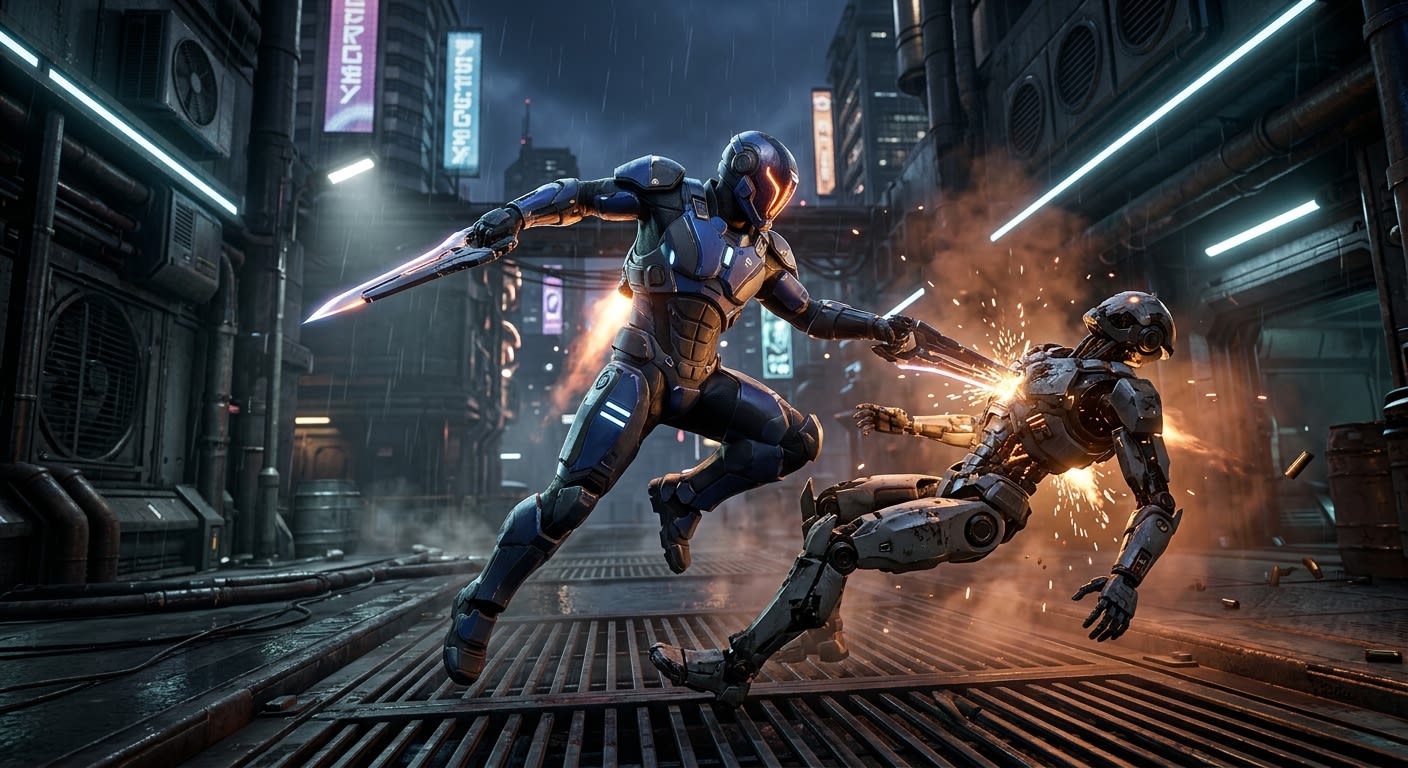
Dynamic Finisher Mechanics: Animating and Stretching Based on Player-Enemy Distance with Motion Warping in Unreal Engine 5
Fundamentals of the Motion Warping System: Analysis of Warp Windows and Warp Targets
In the Unreal Engine 5 environment, especially in character-based games, ensuring that root-motion-enabled animations conform to real-world coordinates is a constant challenge faced by developers. Traditional methods require manually adjusting the entire animation or building complex feedback systems. In this context, "Motion Warping," introduced starting with the Unreal Engine 5.0 release and receiving significant improvements in subsequent versions, offers an innovative and powerful solution to this problem. This section provides an in-depth analysis of the system's core logic, its main components "Warp Windows" and "Warp Targets," and details the role of these configurations in recipient-oriented mechanics such as close-range finisher hits. Motion Warping is a feature that allows root-motion animations to be adapted at runtime based on the character's position. That is, even if an animation assumes the character advances in a specific direction, the outcome of this advancement is automatically adjusted according to player controls, enemy position, or other dynamic factors. This feature provides major advantages in mechanics where a clear relationship must be established between the starting point of the animation and the target, especially in jump attacks, finisher moves, or running attacks.
The foundation of the system is formed by a component running on the character named UMotionWarpingComponent. This component is the central building block that activates and manages the character's Motion Warping feature. The component is accessible via both Blueprint and C++, and allows managing targets with functions like Add or Update Warp Target. However, this component does nothing on its own; the warping process actually depends on specific configurations within an Animation Montage. The most important of these configurations is the UAnimNotifyState_MotionWarping class. This class is used to define a "warping window" that becomes active during a specific time frame within an animation montage. This configuration comes into play when root motion needs to be adapted to world coordinates not throughout the entire animation, but only within a specific range (for example, in the middle part of a dash or the final strike of a finisher). As a result, while other parts of the animation play normally, the desired flexibility is achieved only in the critical region. These windows can be at the beginning, middle, or end of the animation, and multiple different windows can exist in the same montage.
A more detailed analysis of warp windows requires understanding the underlying structure. Each UAnimNotifyState_MotionWarping instance points to a RootMotionModifier type. This modifier is the core structure that determines what kind of adaptation will be made during the warping process, meaning what type of deformation (stretching) will be performed. For example, the basic modifier URootMotionModifier_Warp adjusts the character's position and/or rotation according to a specified target. More specific modifiers can address different needs. For instance, for a finisher animation, a Rotation Modifier can be used during the entry phase to fix the character's rotation, followed by a Translation Modifier during the exit phase when the character is pulled toward the enemy. These modifiers are applied on top of the animation's root motion data when the warping window is active. The UAnimNotifyState_MotionWarping class provides various callback functions regarding the lifecycle of this modifier. For example, OnBecomeRelevant is called when a warp window is added to the montage and its timing begins, at which point the URootMotionModifier_Warp modifier is activated. Similarly, OnWarpBegin is triggered when warping first begins to be applied; OnWarpUpdate during the update for each frame; and OnWarpEnd when the warping window ends. These callback functions can be overridden in C++ or Blueprint to allow adding custom logic to the warping process. For instance, actions like playing a sound effect or starting a particle system when an attack is initiated can be performed in one of these callbacks.
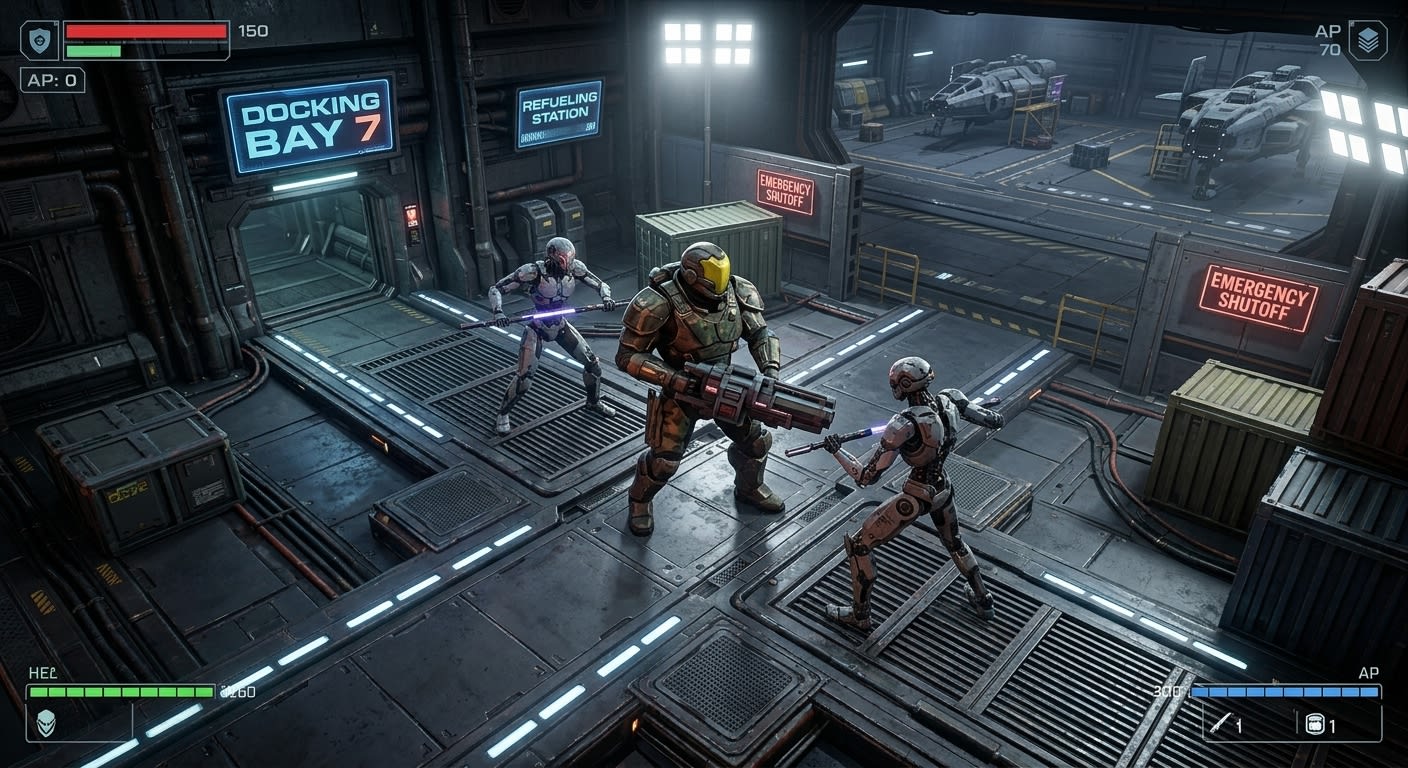
The second core component in this system is the target point referred to as the "Target." The warp target is the point to which the warping process adapts the character's root motion. This target is highly flexible and can be defined in a wide variety of ways. In its simplest form, the target can be a skeletal bone or socket of another character. For example, for a finisher, a "SpineSocket" or "PelvisSocket" on the front side of the enemy can be used as the target. In a more sophisticated approach, the target can be the hit point of a ray-cast made to the point the player is aiming at. This ensures that attacks are more dynamic and user-centric. Additionally, the target can be an empty USceneComponent placed in the scene that can move independently of the character. This flexibility grants developers the freedom to choose the most suitable target option for different mechanics. Targets are registered on the UMotionWarpingComponent with a unique name (as a string). This name is used to update or remove the target at runtime. For example, if a target is registered with the name "TakedownTarget," the "Warp Target Name" parameter of the Add or Update Motion Warping Target node in Blueprint accepts this value.
The following table summarizes the core building blocks that make up the Motion Warping system and their roles:
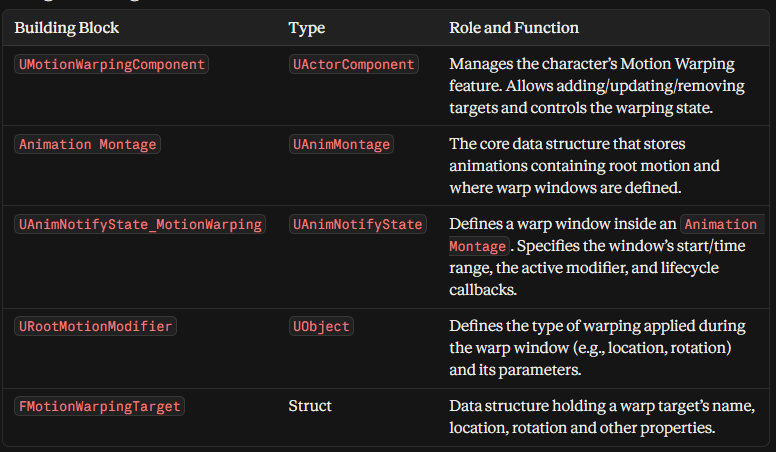
In conclusion, the Motion Warping system begins with the addition of a UMotionWarpingComponent to a character. Next, an Animation Montage equipped with UAnimNotifyState_MotionWarping is played by that character. This montage adapts the character's root motion to a dynamically defined FMotionWarpingTarget at runtime by using the specified URootMotionModifiers (UAnimNotifyState_MotionWarping) during specific time frames (warp windows). This threefold interaction automates the direct binding of animations to the world, significantly easing the design and implementation of complex mechanics such as finishers. Developers can program the behavior of the animation according to game logic with less intervention from animation designers. This foundational structure forms the basis for the dynamic target updating and distance-stretching mechanisms examined in the following sections.
Target Management at Runtime with Blueprint and C++
The power of the Motion Warping system in Unreal Engine 5 lies in its ability to adapt to dynamically changing situations at runtime rather than relying on static settings. Especially in recipient-oriented mechanics like finishers, it is critical that the target (target point) is continuously updated according to dynamic data such as the player's instantaneous position, orientation, and distance relative to the enemy. This section comprehensively explains how a target is dynamically created, updated, and managed using UMotionWarpingComponent via Blueprint and C++. This process follows similar core principles for both visual scripting (Blueprint) and software development (C++), but differs at implementation levels.
The Blueprint API provides developers with numerous ready-to-use and easy-to-use nodes to manage Motion Warping targets. These nodes represent the Add or Update Warp Target function of the UMotionWarpingComponent and contain various parameters specifying the target's position, rotation, and tracking state. The most fundamental and frequently used node is Add or Update Motion Warping Target. The basic inputs of this node are: the target component to which the target will be added, the unique identifier (name) of the target, the location of the target, the rotation of the target, and Follow Component, which is a flag indicating whether to track the component referenced by the target. This node updates an existing target with the specified name if it already exists; otherwise, it creates a new target. This is very efficient for simply updating values rather than recreating the target every frame or whenever an attack is triggered.
In addition to Add or Update Motion Warping Target, Blueprint also provides other helper nodes to create the target at more abstract levels. For example, Add or Update Warp Target from Component uses the location and rotation of a USceneComponent (socket or empty component) as the target. Similarly, nodes like Add or Update Warp Target from Location and Rotation and Add or Update Warp Target from Transform make it possible to define the target directly using location and rotation vectors or a Transform structure. This flexibility allows for complex scenarios where the method of calculating the target can vary depending on game logic. For example, for a finisher, the target could be the contact point of a ray-cast made to the surface of the enemy facing the player. In this case, a ray-cast operation is performed in Blueprint, the location and rotation are obtained from the resulting HitResult, and these values are passed to the Add or Update Warp Target from Location and Rotation node.
Dynamic updating of the target typically occurs at a specific point in the game logic. A typical scenario is as follows: The player triggers a finisher against a nearby enemy. This generally happens from a gameplay ability system or during the character's tick loop. Once triggered, the target location is calculated first. This calculation might involve looking at a socket on the enemy (e.g., "HeadSocket") or looking at the spine (pelvis) of the first enemy in the player's line of sight. The rotation of the target can also be adjusted optionally; for example, the X and Y components of the target's rotation can be zeroed out to ensure the character is facing the target. Finally, this calculated location and rotation are assigned to the target registered with a specific name on the UMotionWarpingComponent (e.g., "TakedownTarget") using the Add or Update Motion Warping Target node. Afterwards, the Animation Montage using this prepared target is played. If the target needs to be updated continuously (for example, if the target is in motion), the Follow Component option can be enabled. This option ensures that the target's position is automatically updated whenever the SceneComponent referenced by the target moves anywhere in the scene. However, this approach has a potential disadvantage: A frame delay may occur if the Owner character's Tick function executes before the target's Tick function. To resolve this issue, it is possible to control the update order by adding a Tick Prerequisite to the target's own Tick function.
On the C++ side, this functionality is directly accessible from the UMotionWarpingComponent class. A function named AddOrUpdateWarpTarget is the key tool for dynamically managing the target. This function takes two main parameters: the unique name of the target (const FName& InTargetName) and an FMotionWarpingTarget structure carrying the target's data (const FMotionWarpingTarget& InTarget). The FMotionWarpingTarget structure contains many properties equivalent to the inputs in Blueprint: Component (reference component), LocationOffset, RotationOffset, bUseRotationOffset (whether to use rotation offset), bUseCustomRotation (whether to use a custom rotation), and CustomRotation (the specified custom rotation). Constructing and populating this structure programmatically requires more code compared to Blueprint, but it also provides greater flexibility and control.
C++ integration is ideal for scenarios requiring target logic to be implemented at deeper layers, such as complex AI behavior or player character controller logic. For example, the AEnemyCharacter class can dynamically determine its target while attacking the player by using its own UMotionWarpingComponent. Although AMainPlayerController directly updates its UMotionWarpingComponent, the same principles apply. The following C++ code snippet demonstrates how this process works:
FMotionWarpingTarget TakedownTarget;
TakedownTarget.TargetName = TEXT("TakedownTarget");
TakedownTarget.Component = EnemyPelvisSocket;
TakedownTarget.bUseRotationOffset = true;
TakedownTarget.RotationOffset = FRotator(0.0f, 90.0f, 0.0f);
UMotionWarpingComponent* MotionWarpingComp = Cast<UMotionWarpingComponent>(GetAbilitySystemComponent());
if (MotionWarpingComp)
{

    MotionWarpingComp->AddOrUpdateWarpTarget(TakedownTarget);
}
This code adds or updates a target named TakedownTarget on the UMotionWarpingComponent based on the enemy's pelvis socket and with a +90-degree rotation offset. Compared to Blueprint, this approach offers a more performance-oriented and type-safe coding experience. Furthermore, the position and rotation of the target can also be retrieved from more complex C++ based systems, such as physics simulation or complex pathfinding algorithms.
The following table compares target management with Blueprint and C++:
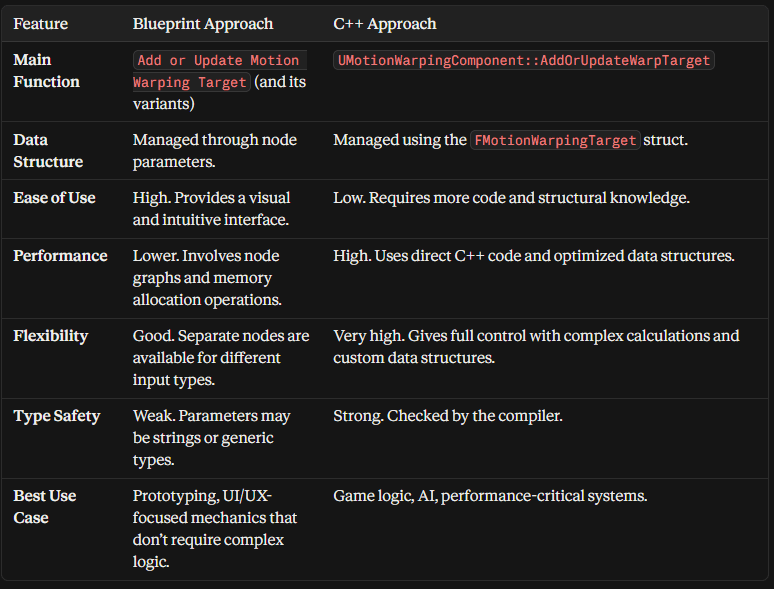
In conclusion, both Blueprint and C++ provide powerful and capable tools to dynamically manage Motion Warping targets. While Blueprint is ideal for rapid iteration and visual logic flow, C++ excels in higher performance, type safety, and complex game logic. In a professional game development project, using these two approaches complementarily is the most efficient strategy. Situations where the target's position is determined by a simple ray-cast can be solved with Blueprint, whereas complex AI behaviors or situations where numerous targets are managed simultaneously can be handled more effectively with C++. In both cases, the core logic is to calculate the position and rotation of the target at a specific point in the game logic and pass this information to the UMotionWarpingComponent.
Stretching Mechanisms Based on Dynamic Distance and Angle Difference
The success of a finisher mechanic depends less on the animation merely looking aesthetically pleasing and more on its ability to interact consistently with the dynamic world of the game. This interaction is achieved by stretching the root motion of the animation, specifically according to the instantaneous distance and angle difference between the player and the enemy. Although the Motion Warping system provides the core mechanism that automatically performs this stretching, it is necessary to understand certain key technical details and potential pitfalls to achieve the desired complex behaviors. This section examines how to achieve stretching based on distance and angle difference using the standard functionality of Motion Warping, while also exploring the limitations that may be encountered during this process and the advanced solutions that can be developed to overcome them.
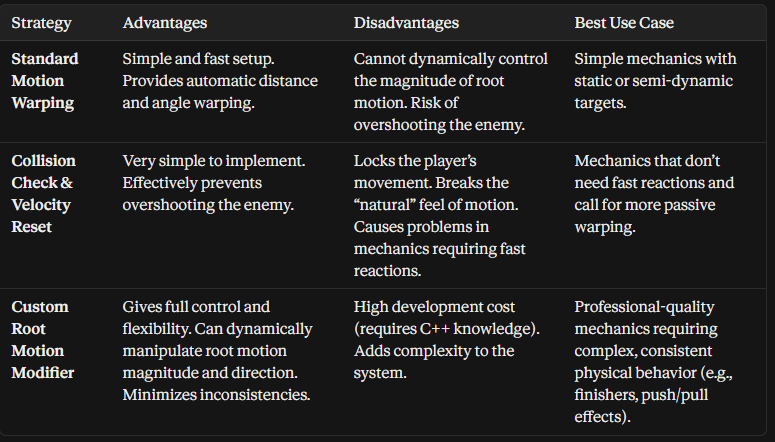
Standard Motion Warping takes the raw root motion data (position and rotation changes) produced by the animation when a root motion window (defined within the animation montage) is activated, and corrects this data according to a specified target. For example, let us assume a finisher animation makes the character take a step 300 cm forward. If this montage is played with a target (target point) pointing at the enemy's chest, instead of moving the character 300 cm forward, the Motion Warping mechanism will only move the character forward by the current distance between the player and the enemy (for example, 150 cm). This prevents the character from overshooting or falling short of the enemy and ensures the animation "snaps" to the target. Rotation stretching works similarly; the rotation data of the animation is adjusted according to the rotation of the target, rotating the character to face the enemy. This is the core logic of stretching based on both distance and angle difference.
However, there is a significant limitation to this simple approach: it tends to assume a static "target distance" for the animation itself. That is, Motion Warping adjusts the direction and position of the animation's root motion relative to the target, but the ability to directly scale the magnitude (length) of this root motion is generally a necessity rather than a core design feature of this system. If the player is too far from the enemy at the exact moment the finisher animation is initiated, warping applies the full 300 cm distance. If they are too close, warping shortens the distance. However, a problem arises: if the player moves toward the enemy after the animation has started and suddenly ends up at the exact same position as the enemy, the warping mechanism cannot detect this situation and may continue to complete the rest of the animation, attempting to carry the player past the enemy. This is an undesired and inconsistent behavior. Similarly, if the player starts directly behind the enemy, the warping mechanism will pull the character toward the target waiting in front of the enemy, but this can cause an awkward rotation making the character appear as if they are coming from behind the enemy.
To solve this problem, developers have devised several workarounds and advanced strategies to dynamically control the magnitude of root motion. The simplest of these is to use a collision check that restricts root motion. In this method, after the attack montage is initiated, a small box trace or sphere trace is started in front of the player's character. This trace checks whether there is an obstacle the player can advance into. If the trace makes contact with the enemy's collider, the velocity of the player's CharacterMovementComponent is zeroed out. This prevents the player from overshooting the enemy. This method compromises the natural flexibility of the movement in Motion Warping because the player no longer advances with entirely unconstrained root motion; their movement is restricted by code. This can cause the player's movement to lock up or "stick," especially in mechanics requiring rapid responses.
A more sophisticated approach is to create a custom root motion modifier that extends the core logic of Motion Warping.
The standard URootMotionModifier_Warp corrects root motion using the target transform, but does not offer the ability to apply additional logic on top of this transform. Since there is no "extension mechanism" that allows developers to add custom logic to this system, they must derive from their own URootMotionModifier class to overcome this limitation. When this custom modifier is derived from URootMotionModifier_Warp, it can customize the warping logic by overriding the Update() function. Inside, before calling Super::Update(), you can take the target transform obtained via GetTargetTransform() and apply your own logic on top of it. For example, you can apply an offset that shifts the target transform backward by a certain amount (negative forward vector) relative to the player's distance to the enemy. This ensures warping reaches the target while preventing the animation's root motion from trying to fill the maximum distance. This is the cleanest and most flexible way to manipulate the magnitude of root motion. This approach allows developers to add completely new behaviors to the Motion Warping system and helps create consistent mechanics that fully comply with the physical and logical rules of the game.
The following table provides a comparison of different stretching strategies:
Additionally, improvements made to Motion Warping in UE5.1 and later versions have enhanced the power of this system. For instance, in version 5.1, support was added to allow a translation to be injected via the warping plugin even though the animation has no root motion at all. This makes even previously root-motion-free animations stretchable and provides a wider range of use cases.
In conclusion, stretching based on dynamic distance and angle difference is the core strength of Motion Warping, but understanding the limitations and potential issues of the system is imperative to achieve the desired professional-level consistency. While simple Collision Checks offer quick but restrictive solutions, the most robust and flexible approach is to create a custom modifier derived from URootMotionModifier. This approach allows developers to design dynamic and reliable finisher mechanics that fully comply with the physical rules of the game and form a cohesive whole with the game mechanics.
Limitations, Potential Issues, and Advanced Solution Approaches
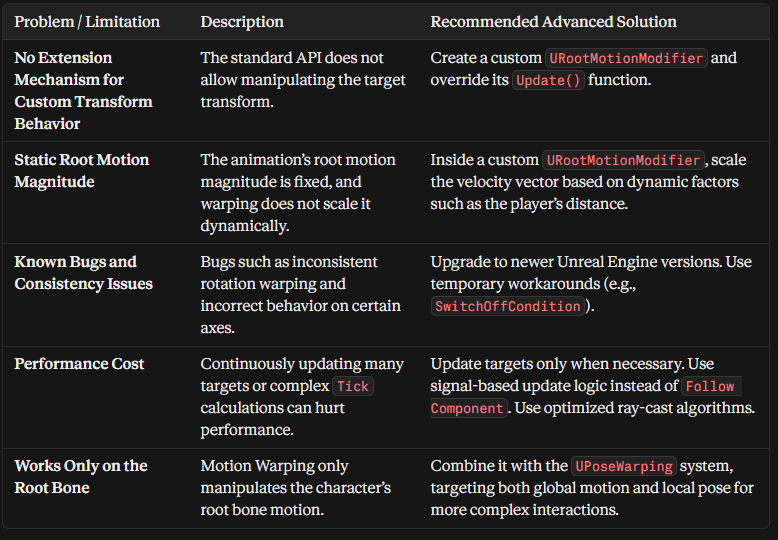
Although Unreal Engine 5's Motion Warping system provides a strong foundation for adapting root motion animations to a dynamic world, it is still an evolving technology, which brings along certain limitations, potential issues, and unexpected behaviors. This section will discuss these challenges, documented bugs, and performance implications that developers may encounter, and present advanced solution approaches that can be developed to overcome these issues. One of the most critical limitations of the system is that it does not provide an "extension mechanism" for developers to add custom logic to the transform of FMotionWarpingTarget at runtime. The current architecture passes the target transform to the warping logic and leaves no chance to manipulate it. This is a severe restriction for advanced mechanics. For example, effects that push a character to a certain distance after hitting an enemy or add a dynamically changing rotation relative to the target are difficult to implement directly with the standard API. The only official way to overcome this issue is to derive from URootMotionModifier and modify the target transform with your own logic in the Update() function. This requires developers to understand the system fundamentally and add their own rules, but it is also the most flexible solution.
Documented bugs are another factor that requires caution when using Motion Warping. For instance, indicated sources state that rotation stretching may not yield consistent results, causing the character to fail to reach the target and land in a different position. Similarly, a bug report stated that in version UE5.0.2, warping only worked on the XY plane and did not function properly on the Z-axis plane. Such platform- or version-based issues emphasize the importance of testing in production environments and developing potential workarounds.
Furthermore, another serious bug is the failure of warping to re-enable after a target is added to a specific animation montage. This bug occurs because the URootMotionModifier_Warp modifier is not re-enabled once deactivated, even if the target is added again. Epic Games has released a patch to fix this issue, but bugs of this nature can pose a significant obstacle, especially for developers working on older versions. When encountering such issues, it is possible as a temporary workaround to use custom conditions derived from UMotionWarpingSwitchOffCondition. For example, a distance-based switch-off condition can keep warping inactive as long as the character is close enough to the target and re-enable warping when the distance decreases.
Performance is another element that needs to be considered, especially in large-scale scenes where Motion Warping is used intensively on complex characters. Characters with a large number of warp targets running simultaneously can place an additional load on the CPU. In particular, updating targets in the Stop function every frame can be expensive in terms of performance. Therefore, updating targets only when necessary—such as when an attack is triggered or the target moves significantly—is critically important for optimization. Although the Follow Component option ensures the target's reference updates automatically when it moves, this situation may also require a check every frame. A more efficient approach is to have the USceneComponent, which is the target's reference, send a change notification and listen to this notification to update the target only on those changes. Additionally, performing complex ray-casts or mathematical calculations within the Stop function can negatively impact performance. Such operations need to be minimized or replaced with more efficient algorithms.
Advanced solution approaches require a deeper understanding and customization of the system to overcome the limitations and issues mentioned above. As already mentioned, custom root motion modifiers are among the most powerful tools. This involves creating classes derived from URootMotionModifier that override the Update() function. These custom modifiers can extend or completely replace standard warping logic. For example, by creating a URootMotionModifier_DirectionalWarp, you can ensure that warping is applied only along a specific axis (e.g., forward axis). Alternatively, by creating a class like URootMotionModifier_WeightedBlend, you can combine the transforms of multiple targets with weights to create a complex target point. This approach puts the Motion Warping system under the developer's complete control and carries the potential to create limitless mechanical variety.
Another advanced approach is combining Pose Warping with Motion Warping. Pose Warping dynamically adjusts the character's pose (bone position and rotation) according to specific targets. This is complementary to the fact that Motion Warping only operates on the root bone. For example, in a finisher mechanic, while Motion Warping tries to pull the character toward the enemy, Pose Warping can pin the character's hands or feet onto the enemy or a target point. This establishes greater consistency and a physical bond between the global movement of the animation and the local pose of the character. The integration of these two systems can ensure that the character "snaps" into the world in a deeper and more consistent manner.
The following table summarizes potential issues related to Motion Warping and the recommended advanced solutions to overcome these issues:
In conclusion, Unreal Engine 5's Motion Warping system is a great starting point for developing professional-level finisher mechanics. However, fully utilizing this system and ensuring it runs smoothly in a productive environment requires developers to thoroughly understand the system's core limitations, potential issues, and performance implications. Rather than simple Blueprint solutions, more advanced approaches—such as C++-based custom root motion modifiers and integration with other Unreal Engine animation systems—should be adopted. This allows developers to view Motion Warping not just as a root motion adjustment tool, but as a game engine component designed to take control of the character's physical and logical behavior.
*Note : Visuals Were Generated by Google Gemini.