
AI Behavior Trees in Game Development: A Comprehensive Analysis of Selector, Sequence, and Decorator Node Structures within the Framework of Unreal Engine 5 and Unity
The evolution of artificial intelligence systems in video games reflects a fundamental paradigm shift advancing from purely deterministic rule sets toward dynamic, modular, and context-aware decision mechanisms. At the heart of this evolution lie mathematical and logical planning models known as "Behavior Trees" (BT). Originally developed for robotics and control systems, particularly inspired by Rodney Brooks's subsumption architecture, these structures proved their worth in the game industry with high-profile projects such as Halo, Bioshock, and Spore. 1 Today, they form the fundamental AI building blocks of modern game engines such as Unreal Engine 5 and Unity. This report comprehensively examines the Selector, Sequence, and Decorator nodes that constitute the core backbone of behavior trees; the theoretical logic behind these nodes, their advantages over Finite State Machines (FSM), their mathematical execution mechanisms, and their specific applications in modern engine architectures.
Theoretical and Mathematical Foundations of Behavior Trees
Behavior trees are directed and hierarchical mathematical tree models that model plan execution in computer science, robotics, and video games. 1 Designed on a hierarchical tree structure, this model has an execution flow that progresses from the root node, through internal nodes (composite nodes), toward leaf (leaf/task) nodes. 3 The most fundamental architectural feature of the system is that each node, when ticked (given an execution cycle), performs a specific logical operation and subsequently returns a specific execution status to the parent node that invoked it. 3 These returned statuses are universally categorized into three main types:
Success: Indicates that the node has completely fulfilled its defined task or logical check and has finished. 3
Failure: Indicates that the node could not fulfill its defined task, encountered an obstacle, or that the condition was not met. 3
Running: Indicates that the task has not yet concluded, is ongoing, and needs to be evaluated again in the next tick cycle. 3
Unlike traditional Decision Trees and simple if-else blocks, the existence of the "Running" status allows behavior trees to execute actions continuously over a duration longer than a single processing cycle (frame/tick), endowing the system with a reactive structure that prevents freezes. 5 In game development, an AI agent moving from point A to point B usually takes seconds; during this process, the executing leaf node continuously returns a "Running" status, keeping parent nodes in a waiting state. 4 This asynchronous execution prevents the engine's main processing pipeline from clogging.
Paradigm Comparison: Finite State Machines (FSM) and Behavior Trees (BT)
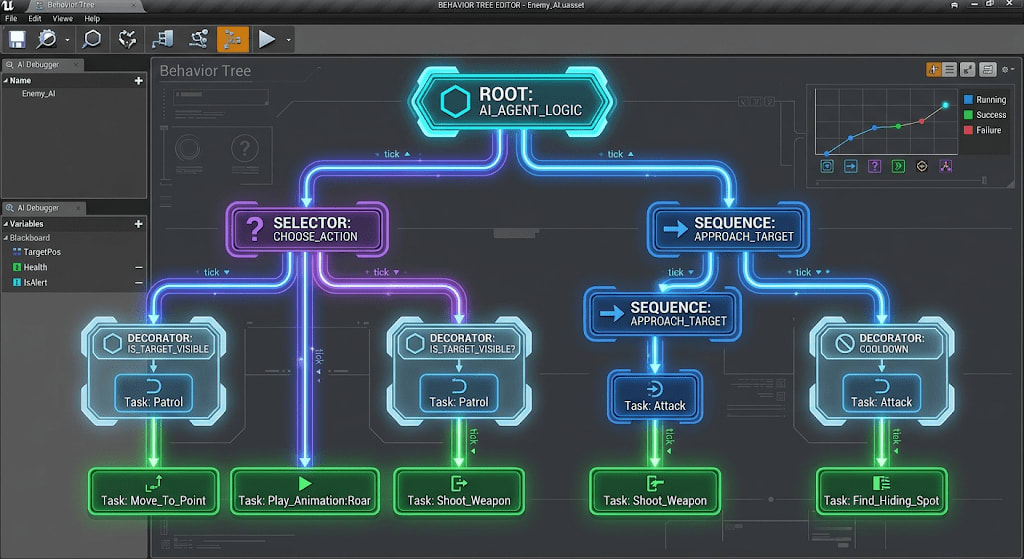
The main reason behind behavior trees becoming the standard in the game industry is that they resolve the architectural bottlenecks brought by Finite State Machines (FSM). An FSM manages the transitions between each state via a predefined adjacency graph. 2 While FSMs are easy to construct and work perfectly when the number of states is low, as the number of states increases, they turn into an uncontrollable "Spaghetti Code" mess due to the exponential growth of transition combinations. 7 In contrast, behavior trees build highly complex actions through the combination (composition) of simple tasks, thanks to their hierarchical structure. 1 How subtasks are implemented acts as a black box for higher-level nodes. 1 Thanks to their reactive nature, upon any external stimulus or high-priority state change, the tree can re-evaluate itself starting from the root or via specific event listeners (observers), aborting current actions and activating the branch suitable for the situation. 5 While in FSMs transitions must be hardcoded into the states themselves or into a separate manager class, in behavior trees control flow and action execution are entirely decoupled from one another. 2
Analysis Metric | Behavior Trees | Finite State Machines (FSM / HFSM) |
|---|---|---|
Architectural Structure | Hierarchical, based on parent/child relationships, with top-down flow. | Adjacency graph and edge transitions between nodes. |
Scalability | High modularity; subtrees can be tested independently, complexity increases linearly as the graph grows. | Transition management becomes exponentially more difficult as complexity increases (risk of spaghetti code). |
Execution Logic | Task-based. Nodes are evaluated dynamically from top to bottom on each tick or event. | State-based. An active state remains fixed until a specific transition condition is met. |
Reactivity | Immediate abort and redirection mechanisms are available for high-priority tasks. | Explicit rules, exit, and enter functions are required to transition from the current state to a new state. |
Memory Management | Past decisions are not stored in tree form; the system processes from the root or current node each time (Memoryless reactivity). | Past actions and decisions create explicit memory on the current state (High expressiveness). |
Table 1: Structural, algorithmic, and operational comparison of Behavior Trees and Finite State Machines in AI systems. This table summarizes the architectural differences and usage scenarios of the two paradigms. 1
When researchers compared BTs with Decision Trees, Teleo-reactive Programs, and FSMs, they proved that FSMs are more "expressive" because they can construct states with access to internal variables and past decisions; in contrast, BTs are much more "reactive" and readable because they start execution from the root (or interrupt it with events) at every new input or tick. 5 Game developers complemented this memoryless yet instantly reactive nature of BTs with data storage units called Blackboards, overcoming the lack of memory and achieving a seamless hybrid data-logic separation. 12
The Epicenter of Control Flow: Composite Nodes
In behavior trees, "Composite Nodes" form the heart of the decision mechanism and logical flow. A composite node is a core framework structure that can have one or more child nodes attached to it and determines in what order, under which priority rules, or according to which logical conditions these children will be executed. 3 The flow geometry universally occurs from top to bottom (parent to child) and left to right (priority branch to secondary branch). 10 The two most fundamental and indispensable composite node models in the system are Sequence and Selector nodes. 3
Sequence Node: Logical "AND" Flow
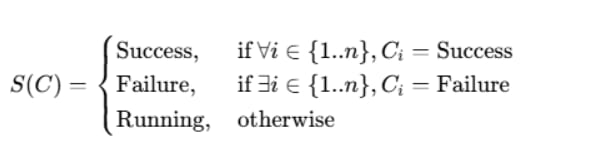
The sequence node is the building block that executes its child nodes starting from the leftmost child and moving rightward in a sequential and strict series of rules. By operational logic, a sequence node can be modeled as a logical "AND" gate in a programming architecture. 3 For the node to be considered as having successfully completed its task, every single child node in the chain must execute and return a "Success" status without exception. 3 If at any point in the chain a child node returns "Failure", the sequence node immediately halts execution at that point, stops running the remaining children to the right, and passes a "Failure" status to its own parent. 3
As long as one of the child nodes returns a "Running" status during execution, the sequence node halts progress and continues to transmit a "Running" status to its parent. 3 On the next system tick, the sequence node resumes execution from that currently running child node; it does not start from the beginning.
Mathematically, the status of a sequence node S, with the statuses of child nodes being respectively, can be expressed with the following equation:
In game development processes, the Sequence Node is an excellent tool for modeling complex sets of actions that are strictly interdependent and must occur in chronological order. Taking a classic "Open Door" action as an example; an AI opening a door can be grouped under a Sequence branch consisting of three separate leaf nodes: "Walk to Door", "Unlock Door", and "Turn Handle and Push". 10 If the character cannot pathfind in the first step and cannot get next to the door (Navigation error - Failure), the entire action sequence ends in failure. Since running the "Unlock" command when the character is not next to the door would be illogical, the Sequence Node detects this error immediately, breaks the chain, and saves CPU cycles. 13 Similarly, a Sequence branch set up for an enemy agent to attack the player is designed as: "Move Toward Player", "Check if in Range", "Face Player", and "Play Attack Animation". If the range check fails, the rotation and attack actions are never executed. 14
Selector / Fallback Node: Logical "OR" Flow

The selector node (also known as Fallback in some engines) works with the exact opposite philosophy of the Sequence node, acting as a flexible problem solver and a logical "OR" gate. 3 This node tries its child nodes again in a hierarchy from left to right, but the moment a child node returns "Success", it stops evaluating other alternatives and immediately returns "Success" to its parent. 3 For a selector node to be considered failed, all child nodes beneath it must be tried without exception and all of them must return "Failure". 3
Just as with the sequence node, if an executing child returns "Running", the selector node is also suspended and reflects the "Running" status to its parent.
Its mathematical definition is as follows:

In game design, this structure is used to allow the artificial intelligence to attempt prioritized different routes, tactics, or reactions to achieve a single overall goal or objective. Since the left side always represents the highest priority, in design practice the most preferred, least costly, or most optimal action is placed furthest to the left, while moving to the right presents alternative, more costly, and less ideal solutions. 3 This creates strong priority layering in the tree architecture. 3
To illustrate this, let us expand the door opening scenario: The character needs to get to the other side of the door. Under a Selector node, three different actions or sub-trees (Sequence) can be ordered. On the far left is "Use Key", in the middle is "Pick the Lock" (slower), and on the far right is "Breach Door" (noisy and dangerous). 10 If the agent has the key in their inventory, the first action is attempted and succeeds. The Selector node cancels all other operations, and the door is passed. However, if the agent does not have the key (Failure), the Selector node does not give up and immediately moves to the "Use Lockpick" option on the right. If that also fails, as a last resort it attempts to breach the door. If all three actions fail (for example, if the door is an unbreakable steel door), only then does the Selector node report to its parent that all alternatives have been exhausted (Failure). 10 This priority-based OR architecture reflects the true power of selector nodes in producing extremely sophisticated and natural-feeling artificial
intelligence behaviors.
Execution Manipulation: Decorator Nodes
While composite nodes organize the order and execution logic of their children, decorator nodes are tasked with fine-tuning the control mechanisms within the tree. Sharing the same name as the "Decorator" design pattern in software engineering, this structure—unlike composite nodes—can only have a single child node (or subtree) and manipulates the execution rules, returned results, or loop mechanisms of this child by wrapping around it externally like armor.3 Decorators function as conditional barriers (Conditionals) or Guard Nodes that decide whether a branch can be executed or not.15
Core Functions and Use Cases of Decorators
The most common and vital use of decorators in game artificial intelligence is condition checks (Conditionals).4 A branch of the AI tree becomes accessible only when the conditions defined by the decorator are met. For example, a decorator placed at the head of an "Attack" branch aimed at attacking the enemy continuously monitors checks such as "Is the Enemy in Line of Sight?" or "Is Weapon Loaded?".3 If the condition is not valid, the decorator immediately blocks the execution of its child and directly returns a "Failure" status.4
In addition to conditions, decorators also have variants that directly modify the outcomes of the flow or bind actions to a specific timeline 4:
Inverter: Works like a logical "NOT" gate. If the child node fails, it returns "Success" to the parent; if the child succeeds, it returns "Failure".4 It is used especially when a certain state is required not to happen (E.g., "Patrol If Enemy Is Not Nearby").
Succeeder: Regardless of the child's outcome, even if it fails, it forcibly returns "Success" to the parent node.4 This is used within a large Sequence chain to prevent an optional task whose failure is unimportant (E.g., "Shout at enemy") from breaking the entire chain.18
Repeat: Allows a specific node or branch to be repeated consecutively a set number of times, infinitely, or until it succeeds/fails.4
Cooldown and Time Out (Time Constraints): Cooldown puts a mandatory waiting period between two consecutive executions of a branch (E.g., Ability cooldowns). Time Out ensures that a long-running operation (Running) is forcibly failed and canceled after a specified number of seconds pass.4
Unreal Engine 5: Event-Driven Behavior Tree Architecture
Unreal Engine 5 (UE5) delivers its industry-standard behavior tree implementation with unique, high-performance, and complex architectural modifications. The deepest and most important of these modifications is that UE5's behavior trees operate on a completely "Event-Driven" architecture.16 In classic behavior trees, the system continuously re-evaluates the entire tree from the root down to the leaves on every processing frame (frame/tick) to test the validity of actions. This "polling"-based approach places a massive load on central processing unit (CPU) performance in a game with hundreds of enemies.19
According to Unreal Engine documentation, behavior trees within the engine operate in a passive listening mode to avoid this unnecessary processing load. Instead of checking conditions on every frame, the system waits for "events" triggered by changes to variables on the Blackboard, and opens, closes, or re-evaluates the necessary branches of the tree only when the relevant variable changes.16
Within UE5, an AI profile is fundamentally powered by: the AI Controller that manages the AI brain, the Blackboard database that holds memory and variables, the Behavior Tree that charts the decision logic, and Tasks that perform actions, Decorators that filter states, and Services that update data.12 The Blackboard is a data class that stores contextual data such as the character's targets, current location, enemies in its field of view, or patrol points, and lives completely independent of the behavior tree.12 The behavior tree is merely a logic processor; it pulls data from the Blackboard, makes the decision, and fires the Task.19
Composite Nodes in UE5: Selector, Sequence, and Simple Parallel
In the UE5 interface, the "Selector" node is used to make tactical transitions between subtrees, while the "Sequence" node is used to execute a series of sub-actions in order.12 Instead of the complex Parallel nodes found in traditional systems, UE5 uses the "Simple Parallel" node for ease of use and stability.14 The Simple Parallel node has exactly two connections: A "Main Task" and a "Background Branch". The main task must always be a leaf node (Task). While the agent executes its main task on one hand (E.g., "Shoot Enemy"), the background branch runs simultaneously (E.g., "Continuously move away from the enemy"). How the node reacts when the main task ends or the background ends can be configured in the settings.14
Heart of the System: Observer Aborts Mechanism
The core feature that makes Unreal Engine 5's behavior tree system unmatched and ensures that in-game AI feels "alive" is the "Observer Aborts" mechanism integrated directly into decorators at the hardware level.21 An AI agent does not have to return to the root of the tree and re-traverse all branches to evaluate a specific external state (such as the enemy moving out of the field of view). Instead, decorators passively listen to (observe) the Blackboard variable.17
The Observer Abort feature, which determines how the system will cut branches when conditions change, offers developers four different parameters 22:
Observer Abort Mode | Functional Description and Operational Impact |
|---|---|
None | Even if listening takes place, no instantaneous interrupt is made. The tree evaluates the condition in its normal flow when its hierarchical turn comes to the decorator. The occurrence of a high-priority event cannot interrupt a low-priority task midway. |
Self | Covers only the node to which the decorator is attached and the subtree beneath that node. If the condition suddenly becomes invalid while execution is currently inside this branch (for example, if the enemy leaves range while on the "Attack" branch), the branch is instantly canceled and the tree reports a "Failure" status to the upper hierarchy. |
Lower Priority | The decorator observes branches with lower priority than itself (remaining to the right of it). While the agent is performing a low-priority action on the right side (E.g., Patrolling), when this decorator's condition is met (E.g., Enemy spotted), the system immediately cancels the patrol task on the right and pulls the flow to the left (into this branch). |
Both | This is the most reactive mode where "Self" and "Lower Priority" features work simultaneously. It both cancels itself when the condition of the currently executed branch breaks, and cancels the low priority and takes over the flow when its own condition is met while performing a low-priority action. |
Table 2: Systematic and Tactical Operation of Unreal Engine 5 Observer Aborts Parameters.
To explain through an analysis scenario; while the agent is running the "Patrol" sequence node (low priority, right branch), when the player enters the agent's field of view, the "HasLineOfSight" key on the Blackboard becomes "True" (Set). If the decorator standing at the head of the "Chase" branch on the left is set to "Lower Priority" or "Both", the system instantly cancels the patrolling Task node (even if it is in the middle of a long navigation process) and switches execution to the high-priority "Chase" branch.14 This is the software equivalent of a hardware "interrupt" signal in operating systems within game AI, enabling the AI to make hyper-reactive, instantaneous decisions. If the condition breaks again (the player hides) and the decorator is set to "Both" or "Self", the "Chase" task is instantly aborted and the system returns to the patrol routine on the right.14 In cases where multiple decorators try to cancel low-priority tasks, the conditions of the decorator furthest to the left (highest priority) must be met.22
Service Nodes in UE5 Architecture
Completely distinct from classic behavior tree concepts and developed specifically for UE5, another building block is a specific node type called "Service". Services do not perform actions like leaf nodes, nor do they interrupt flow like decorators. They are update nodes that can only be attached to Composite Nodes (Selector/Sequence) and are continuously triggered at specified time intervals (frequency) in the background as long as that branch is executed.27

Developers use Services to track the moving position of a target, calculate the distance to the player, or regularly update data on the Blackboard by checking environmental variables.19 While other game engines require writing complex parallel branches (Parallel Nodes) or heavy C# code for such periodic data updates, UE5 localizes this to a specific branch of the tree, optimizing CPU performance incredibly. A service runs its "Tick" method as long as the Sequence or Selector it is attached to is active, and stops spending performance by shutting down when exiting that branch.27
Unity 6 Behavior Package (v1.0+): Modern, Visual, and Versatile Tree Architecture
Historically, developers using the Unity engine have mostly had to rely on third-party asset plugins such as NodeCanvas, Behavior Designer, or Playmaker for complex in-game AI solutions in their projects.30 However, with the official "Unity Behavior" (version 1.0.x) package introduced in Unity 6000 versions and beyond, the engine has gained an integrated, performance-optimized, and fully event-driven official visual logic editor.
Unity engineers have branded this modern structure they created as "Behavior Graphs" to distinguish it from the rigid hierarchies of classic behavior trees and to emphasize that it contains non-linear and much more adaptive features where branches can rejoin (Join nodes). The Unity Behavior system is deeply integrated into the engine's underlying serialization infrastructure and C# logic. Just like in UE5, data transportation tasks are managed via "Blackboard" variables, while graph logic works with event-based triggers. Nodes in the system are divided into two main groups according to their universal functions: "Control flow" nodes that decide where the flow goes, and "Action" nodes that perform concrete actions, usually color-coded in gray. Control flow nodes, on the other hand, are classified within themselves as Sequencing and Modifier nodes.
Sequencing Nodes in Unity: Sequence and Try In Order
Although Sequencing Nodes in the Unity package perform the exact same Sequence and Selector logic as classic trees, they use a different and innovative syntax in terms of naming and functional arrangement. The traditional "Selector" node is called "Try In Order" in the Unity ecosystem.
Sequence Node: Works in exact traditional logic. Runs branches sequentially from left to right; if any fails, it breaks the flow and returns Failure, if all succeed, it returns Success. One of the most innovative features of the Unity Behavior interface is the "Implicit Sequence / Stacking" structure. When multiple action nodes are stacked vertically on top of each other in the visual editor (for example, adding three animation nodes back-to-back), the system does not require an additional Sequence node to connect them. At runtime, this stacked structure automatically transforms into a hidden Sequence node. Thus, visual graph clutter and the "Spaghetti" look are massively reduced.
Try In Order Node: As the name suggests, this node tries branches sequentially from left to right until one option "Succeeds". In this context, it is the exact logical equivalent of the "Selector" or "Fallback" node in classic behavior trees. It is generally used in scenarios where the agent needs to find the "best option" from different strategies.
Run In Parallel and Random Nodes: These are flow structures used to run all connected branches simultaneously (concurrently) or to pick completely randomly from the children. In parallel executions, the parent node's logic can be fine-tuned with details such as "Wait For All" (Wait for all branches to finish successfully) or "Wait For Any" (Any single branch finishing is sufficient).
Modifier Nodes and Event-Driven Interruption Architecture
Unity Behavior has gathered the classic "Decorator" node concept from traditional trees under the category of "Modifier" nodes, placing it into a much more functional framework. A modifier node is a control structure that can have only a single child, directly managing the operating mode, execution count (Repeat), returned status (Inverter, Succeeder), or active condition (Cooldown) of the connected child branch. The most vital subtypes of these nodes that manage gameplay flow in the Unity ecosystem are "Abort" and "Restart" modifications. When the conditions set via the Node Inspector (E.g., Health < 20) are met (Any Are True / All Are True), the Abort node immediately stops the execution of the branch beneath it and propagates a Failure to its parent. Restart, on the other hand, works with the exact opposite logic, resetting a currently executing branch and starting it over from the very beginning when the conditions become appropriate.
The true revolution in Unity's modern system is the "Observer-based priority interruption" system, which is a direct reflection of Unreal Engine's legendary "Observer Aborts" mechanism. According to official guides, this structure allows high-priority actions (left branches in the graph) to automatically interrupt low-priority actions (right branches) when conditions are met. Developers do not have to write lengthy guard clauses on the patrol branch for an enemy agent to suddenly drop its "Patrol" task and jump to the "Attack" branch upon attacking. The high-priority left branch (Attack) defines its condition in "Observer Abort" mode. Thus, the system automatically monitors the patrol action on the right side in the background, and when the condition occurs, it cancels the low-priority operation and shifts the flow to the left. Likewise, the "Self" observer is also active in Unity; if an active branch's own prerequisites become invalid while it is executing, the action is cancelled instantly. This creates behavior graphs with low maintenance complexity and extremely readable hierarchies (priority from left to right).
Additionally, Unity Behavior directly supports Subgraphs. A complex behavior (such as drawing a patrol route) can be saved as a small graph and dynamically or statically embedded into the main tree via the "Run Subgraph" button, securing the modular design of massive artificial intelligence systems. Developers can integrate their own custom action nodes (Custom Action Nodes) into the Behavior system in seconds with scripts containing OnStart, OnUpdate, and OnEnd methods, which resemble the traditional C# MonoBehaviour structure.
Architectural Synthesis: Comparative Analysis of Unreal Engine 5 and Unity Behavior Frameworks
Although Unreal Engine 5 and Unity, the two dominant game engines of the sector, fundamentally rely on the same mathematical theory and hierarchical structure that breaks the complexity of FSMs for artificial intelligence decisions, they exhibit distinct differences in their user interfaces, terminologies, and specific problem-solving methodologies.
Concept / Functional Mechanism | Unreal Engine 5 (Behavior Tree) | Unity Behavior (v1.0+) (Behavior Graph) |
|---|---|---|
Logical OR Node | Selector Node. Moves right until it finds a successful child. | Try In Order Node. The function is completely identical except for the naming. |
Logical AND Node | Sequence Node. Classic hierarchical tree layout. | Sequence Node / Implicit Stacking. Vertical layouts automatically create hidden sequence nodes. |
Node Condition / Armor Filters | Decorator Node. Holds the entry of the branch. | Modifier Node / Conditional Branch. Modifies the flow direction, loop count, and logic. |
Dynamic Interruption and Reactivity System | Observer Aborts (None, Self, Lower Priority, Both). Passively listens to blackboard variables. | Observer-Based Priority Interruption (Self, Priority). High priority always interrupts low priority. |
Background Data Update | Service Node. Added to composite nodes, ticks at specific frequencies as the branch runs. | Processed in parallel with Run In Parallel nodes, C# scripts, or Action nodes within the graph. |
Subtree Organization and Modularity | Run Behavior Tree (Another tree is run as a Task from within a tree). | Run Subgraph (Subgraphs are embedded with Static or Dynamic variables). |
State and Data Transfer Mechanism | Blackboard Data Asset (Independent data asset and Keys). | Blackboard Variables (Visual Blackboard interface and C# reference links). |
Table 3: Terminological and operational equivalents of Artificial Intelligence Behavior Tree concepts in Unreal Engine 5 and Unity Behavior (version 1.0.15+) platforms. While both engines aim for modularity, Unity has prioritized "human-readable" naming.
Analyses and operational statistics show that, compared to the number of transitions in classic FSM designs that increase exponentially proportional to the square of the number of states (), designing new behaviors in Behavior Tree architectures only requires adding new action or decorator nodes () to the tree. This linear structural growth has enabled massive, reactive, and error-free AI designs that have become the industry standard on both Unity and Unreal platforms. However, the manipulation of the "Running" state is extremely important to prevent a long-running operation from causing the tree to freeze. When an AI agent is commanded to go from point A to point B, it returns "Running" in every cycle until this task is completed. When the process finishes without errors, the success state is sealed with the "Finish Execute" node inside the Blueprint on the UE5 side, and with the OnEnd methodology in the C# script on the Unity side.
Advanced Concepts and Hybrid Systems: State Trees
Although the "memoryless reactivity" model of behavior trees provides an unmatched superiority when it comes to tactical combat or instant decisions (micro-management), it struggles to control the very long-term moods, past contexts, or macro-modes of the AI. One of the criticisms most voiced by developers is the necessity of keeping the data of past decisions in the Blackboard or global variables rather than in the design of the tree.
Thanks to the flexibility provided by the UE5 and Unity engines, developers have found ways to overcome these structural limitations by synthesizing behavior trees with FSMs. Especially with Unreal Engine 5.1, a new and groundbreaking concept called "State Trees" has been included in the engine's artificial intelligence ecosystem. State trees are a hybrid system that is an architectural combination of FSM and Behavior Trees. State Trees use the state machine structure for general and broad-scope state management (E.g., Combat, Escape, Patrol, Sleep). However, when the machine switches to the "Combat" state, the second-by-second reactions and set of actions within this state are bound to specific transitions and task-based evaluations using tree logic.
The most proficient methodology applied by professionals in modern game design philosophy is running these two systems in parallel. Developers manage the mood and macro-states of agents, such as "Calm", "Suspicious", or "Aggressive", via a State Tree or a macro-manager class.
5 When the system switches to the "Aggressive" state, what the FSM actually triggers as an action is running a complex "Attack Behavior Tree". Decisions on whether the agent should run towards the enemy at that second, take cover and reload, or whether it is at the correct distance to throw a grenade are made by the Selector and Sequence nodes inside the BTs. 46 This macro-FSM and micro-BT synthesis flawlessly blends the high expressive power of state machines with the high reactivity of behavior trees.
Conclusion
Planning execution and algorithmic logic chains of artificial intelligence in video games have gained unique flexibility, modularity, and design hierarchy thanks to Behavior Trees, which have turned into a massive industry standard over the years. While sequence nodes guarantee the exact chaining of actions and instantly filter out failures, selector nodes allow for tactical prioritization, reactive decision making, and faultless testing of alternatives. Decorator (Modifier) nodes, which wrap around this entire composite body like an external shell, ensure that instant reactions are given to dynamic external stimuli and the flow is manipulated. Unreal Engine 5 offers a very mature and low performance cost ecosystem in artificial intelligence programming with its unique event-driven infrastructure, Blackboard optimizations, Service nodes providing micro-adjustments, and unique Observer Abort mechanisms. On the other hand, Unity, with the official Unity Behavior (Behavior Graphs) package integrated into the heart of the engine with its 6th generation, has brought this standard to an extremely accessible dimension in visualization, reading with fluid namings like "Try In Order", and constructing massive non-linear graphs with modern C# integration. This hierarchical structure established compared to classic Finite State Machines (FSMs) not only selects the agent's next move; it also reinforces its indisputable authority in the game engine ecosystem by securing the readability of large-scale AI systems, debugging processes, and project-based modularity via reusable subgraphs. Systematic analysis shows that the correct use of proper composition, decoration, and event-driven interruption (Abort) strategies in modern projects is the most fundamental and critical condition for creating organic, intelligent, and living agents that static codes alone cannot produce.
*Note : Visuals Have Been Generated By Google Gemini.